Neptune Apex Display
$206.99
- Ships any business day
- Products we use on our own reefs
- Questions? Ask a reef keeper
Share
Product details
Neptune Systems Apex Display Module – Aquarium Controller Display
About This Product
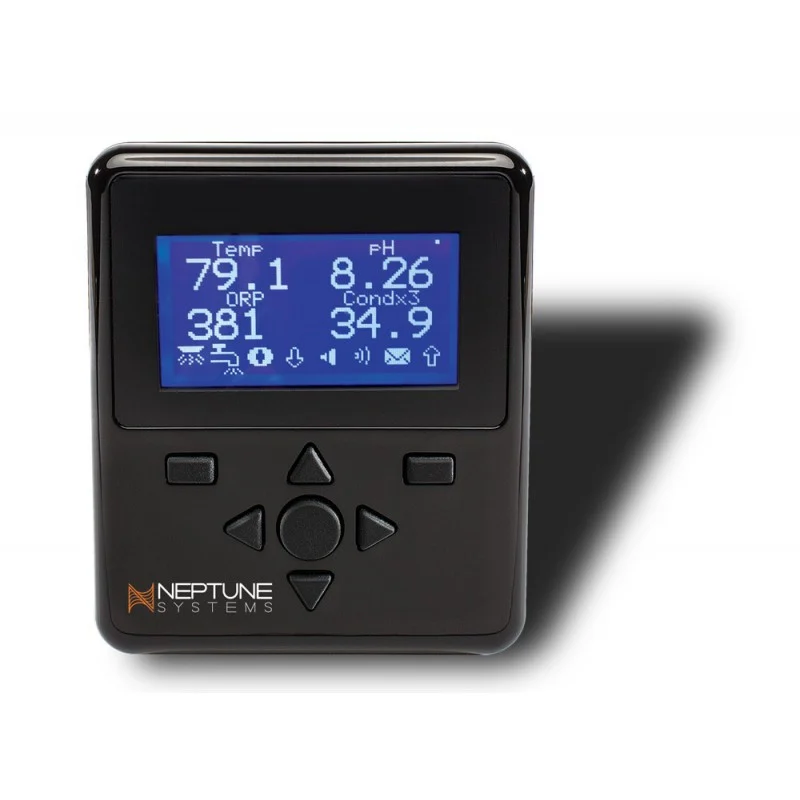
The Neptune Systems Apex Display Module (ADM) is a convenient, easy-to-use aquarium monitoring and control accessory designed for compatible Neptune Systems Apex aquarium controllers. Featuring a high-resolution backlit graphical display, durable mechanical buttons, and a built-in audible alarm system, the Apex Display provides direct access to important aquarium information and controller functions without requiring a smartphone or computer.
Designed to work alongside the Neptune Systems Apex Base Unit, this compact display module allows aquarists to monitor aquarium conditions, view equipment status, and access controller settings directly from a dedicated physical control panel. Its customizable graphical interface can display aquarium parameters, status indicators, and other information collected by the connected Apex system.
One of the Apex Display’s standout features is its high-quality mechanical keypad. Unlike membrane or capacitive touch controls, which may be more susceptible to problems in humid environments, the Apex Display uses physical buttons designed for dependable operation. This makes it particularly useful for aquarium installations where moisture and humidity are common concerns.
The module’s adjustable-contrast, backlit graphical screen provides excellent readability in a variety of lighting conditions. Users can customize the display with graphs, icons, and different text sizes to create an interface suited to their monitoring preferences.
An integrated speaker provides programmable audible alerts, allowing the Apex system to notify users of important aquarium conditions, including abnormal temperatures, water leaks, and other events detected by compatible sensors and configured alarms.
The Apex Display also supports multiple display modules on a single compatible Apex system. This allows additional control panels to be positioned in different locations, such as near the aquarium, inside an equipment room, or beside a filtration system.
Connected through Neptune Systems’ AquaBus interface, the Display Module integrates with compatible Apex controllers and receives its operating power through the system connection.
Whether you’re adding a dedicated control panel to an existing Apex installation, replacing an older display, or expanding your aquarium monitoring capabilities, the Neptune Systems Apex Display Module offers convenient access to aquarium information and equipment controls.
Features:
- Dedicated Apex aquarium controller display provides direct access to monitoring information and control functions.
- High-resolution backlit graphical screen displays aquarium parameters, equipment status, and customizable information.
- Adjustable screen contrast improves readability under different lighting conditions.
- Durable mechanical keypad features physical buttons designed for dependable operation in aquarium environments.
- Seven-button control interface provides convenient navigation through menus and controller settings.
- Integrated audible alarm speaker plays multiple alarm tones and notifications configured through the Apex controller.
- Customizable display layout supports graphs, icons, and multiple text sizes.
- Real-time aquarium monitoring displays information supplied by compatible Apex probes and modules.
- Convenient equipment control provides access to supported Apex-controlled devices and outlets.
- AquaBus connectivity allows integration with compatible Neptune Systems Apex controllers.
- Multiple display support allows additional control panels to be connected to a single compatible Apex system.
- Compact, space-saving design makes installation convenient near aquariums and filtration equipment.
- Flexible mounting options include rear keyhole mounting slots or suitable hook-and-loop fasteners.
- Useful for equipment rooms provides a dedicated control interface where smartphones and computers may be inconvenient.
- Suitable for freshwater and saltwater systems using compatible Apex aquarium controllers.
- Genuine Neptune Systems accessory designed to integrate with the Apex monitoring and automation platform.
Specifications:
- Brand: Neptune Systems
- Product name: Apex Display Module
- Model: ADM
- Product type: Aquarium controller display and control module
- Display type: Backlit graphical display
- Display color: Monochrome
- Contrast adjustment: Yes
- User interface: Mechanical button keypad
- Number of operational buttons: 7
- Display customization: Graphs, icons, and multiple text sizes
- Audible alarms: Yes
- Built-in speaker: Yes
- Alarm sounds: Multiple selectable tones supported by the Apex system
- Connection interface: Neptune Systems AquaBus
- Power source: Compatible Apex AquaBus connection
- Multiple display support: Yes
- Mounting options: Rear keyhole slots or suitable hook-and-loop fasteners
- Primary compatibility: Neptune Systems Apex aquarium controllers
- Apex Classic compatibility: Yes
- Apex A2 compatibility: Yes, with supported configurations
- Apex A3 compatibility: Yes, with supported configurations
- Water resistance: Not waterproof
- Installation location: Dry area above aquarium water level
- Standalone operation: No; compatible Apex Base Unit required
- Temperature monitoring: Displays readings from compatible connected Apex sensors
- pH monitoring: Displays readings from compatible connected Apex sensors
- ORP monitoring: Displays readings from compatible connected Apex sensors
- Salinity monitoring: Displays readings when the Apex system includes compatible monitoring hardware
- Aquarium compatibility: Freshwater and saltwater
- Recommended application: Aquarium monitoring, equipment control, system configuration, and audible alarm notifications
Installation and Maintenance Recommendations:
Mount the Neptune Systems Apex Display Module in a dry, easily accessible location near the aquarium or filtration equipment. The display should be installed above the aquarium’s water level and protected from splashes, condensation, and accidental water exposure.
Use the mounting keyholes on the rear of the module or appropriate hook-and-loop fasteners to secure it to a suitable surface.
Connect the display to a compatible Apex system using the AquaBus connection and follow Neptune Systems’ setup instructions.
Once connected, configure the display according to your monitoring preferences. Customize the displayed aquarium parameters, equipment information, graphical indicators, and available control functions.
Configure audible alarms through the Apex controller to provide notifications for important aquarium events, such as temperature fluctuations, water level problems, or other sensor conditions.
Keep the display clean and dry. Use a soft, dry cloth to remove dust or fingerprints, and avoid spraying liquids directly onto the screen or keypad.
Important Compatibility Information:
The Neptune Systems Apex Display Module is an accessory and requires a compatible Apex Base Unit to operate.
This product is not a standalone aquarium controller and does not independently measure water parameters. Displayed readings require the appropriate sensors, probes, and modules connected to the Apex system.
The module connects through AquaBus and is not a WiFi or Bluetooth display.
The Apex Display is not waterproof. Always mount it in a dry location above the aquarium waterline and provide drip loops in connected cables.
AquaBus cable inclusion may vary by product package. Verify the contents of your selected unit before installation.
Recommended application: A dedicated aquarium monitoring and control display ideal for freshwater and saltwater aquarium systems using compatible Neptune Systems Apex controllers. Provides convenient access to aquarium conditions, equipment controls, system settings, and audible alarms without relying exclusively on a smartphone or computer.