

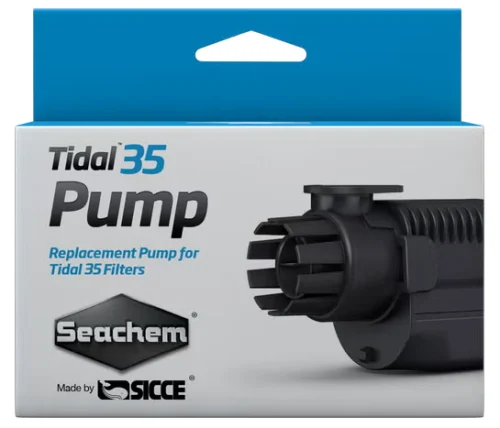
Seachem Tidal 35 Replacement Pump: When and How to Install
You'll learn when your Tidal 35 pump has failed and how to safely remove the old pump and install the replacement in your hang-on-back filter.
Equipment maintenance · Detailed tutorial · About 15 minutes · Beginner friendly
The key habit: When your Tidal 35 pump fails, act fast—reduced water flow or silence in your filter means your tank's biological and mechanical filtration stops working, and water quality can crash within hours.
Shop the Seachem Tidal 35 Replacement Pump 120V 60Hz (6587)
In this guide
- Signs your pump is failing
- Safety and preparation
- Removing the old pump
- Cleaning the pump housing and shaft
- Installing the replacement pump
- Testing and next steps
- Troubleshooting after replacement
1. Signs your pump is failing
The Tidal pump is the matching replacement piece for the Seachem filter of the same name. Like any mechanical part, the pump's impeller and motor eventually wear out. Unusual noises or vibrations, such as buzzing or excessive sound, can indicate loose parts or a motor that's wearing out. If water flow seems weaker than it used to, it's often a sign that the pump isn't functioning properly. In severe cases, impellers can become warped and scratched over time by grit making its way into the filter.
A well-functioning pump maintains optimal water circulation, which is crucial for keeping the water freshly oxygenated and supporting the filtration system, drawing waste and other particles away from your fish and through the filter. When your pump stops working, this stops too, and your tank becomes vulnerable to bacterial blooms and rising ammonia.
2. Safety and preparation
Safety comes first. Before any maintenance on the Tidal Filter, unplug it from the outlet. Never operate the pump without water to avoid damage to the pump motor.
Gather before you start
- The Seachem Tidal 35 Replacement Pump
- A clean towel or paper towels
- A small bucket for holding the impeller during cleaning (optional)
- Vinegar and water in a spray bottle (1 part white vinegar to 3 parts water), for descaling
- Your new pump in its packaging
3. Removing the old pump
The pump housing sits inside your filter. To reach it, follow these steps:
1. Unplug the filter from the wall outlet and wait 30 seconds for any residual electricity to dissipate.
2. Pull the power cord from the filter body.
3. Release the filter housing. Pull outward on the bottom right corner of the filter body releasing the hook and pull downward on the pump. The pump assembly will slide down and out of the filter. It will still contain water, so be gentle.
4. Gently remove the intake cover of the pump away. This reveals the impeller (the spinning wheel) beneath. Set this cover aside in a clean spot.
4. Cleaning the pump housing and shaft
Before you install your new pump, the housing that holds it needs to be clean. You should remove the impeller assembly and clean it, as well as the housing into which it slides, as you will often find a brownish bacterial slime covering these parts that can reduce water flow.
1. Remove the old impeller by sliding it gently off the shaft. If it's stuck, wiggle it gently—do not force it or you may damage the shaft.
2. Wipe out the housing with a clean, damp cloth to remove slime and debris.
3. Clean the shaft. Wash the shaft thoroughly to remove any slime or scales build up. Do not use soap or detergent. If desired a dilute solution of vinegar and water can be used to break up any scale or lime buildup. This is especially important in reef tanks where calcium deposits can build up. Use your cloth or a soft brush.
4. Let it dry before proceeding.
5. Installing the replacement pump
Your new Seachem Tidal 35 pump comes with a new impeller already attached and ready to use.
1. Align the pump housing with the opening in your filter where it came out.
2. Slide the pump in gently, seating it fully so that the housing clicks or seats securely. The pump is self priming and makes it unnecessary to fill the filter basket with water. This means you do not need to manually prime it.
3. Gently slide the intake cover back over the impeller. It should fit snugly.
4. Reconnect the power cord to the filter body by sliding it into the guides as it was before. Make sure it is routed safely away from the aquarium and forms a drip loop at the outlet (the cord loops down below the outlet before going up to the plug). This prevents water from running down the cord into the wall outlet if the filter leaks.
6. Testing and next steps
Before you trust your new pump with your tank for days, test it.
1. Plug the filter in and watch it for the first 30 seconds.
2. Listen for normal operation. The Tidal pump can be restarted without any problems even after a power failure or maintenance. The pump should hum quietly—not buzz, rattle, or grind.
3. Check for leaks around the pump housing where it joins the filter body. A small drip is normal during the first minute; ongoing leaking means something is not seated correctly.
4. Verify water flow. Look at the output stream from your filter's return tube. It should flow steadily and smoothly, the same as when the filter was new.
7. Troubleshooting after replacement
| What you notice | What to check next |
|---|---|
| Pump buzzes or hums loudly | The impeller may not be fully seated on the shaft; remove and reseat it. Also check for debris inside the housing. |
| Reduced water flow | The intake area of the filter may be clogged; clean your filter media and intake tube. |
| Filter leaks from the pump housing | The intake cover may not be fully sealed; try removing it and reseating it gently. |
| Pump is silent and won't start | Confirm the outlet is powered; try a different outlet to test. Check that the power cord is fully connected. |
| Filter still makes noise after pump replacement | Noise can come from the media basket itself if it's vibrating; check that the filter sits level on your tank. |
Your care log
Pump replaced on: _______ Model: Seachem Tidal 35 Replacement Pump (120V 60Hz) Serial number (if available): _______
First flow test passed: _______ Filter runs quietly: Yes / No
Next impeller cleaning due: _______ Notes on installation: _______
Sources
Checked October 8, 2026.
- Seachem, "Tidal™ Power Filters: Features and FAQ", https://www.seachem.com/tidal-filters.php
- Seachem Laboratories, Inc., "Seachem Tidal 35 Owner's Manual", https://www.sicce.com/media/wysiwyg/ISTRUZIONI/80N652-A_Tidal_35_Instruction.pdf
- Steven J. Schiff, "Maintaining Your Canister Filter", https://aquariumsetup.substack.com/p/maintaining-your-canister-filter
- Charterhouse Aquatics, "How to Clean an Aquarium Filter Pump: A Step-by-Step Guide", https://charterhouse-aquatics.com/blogs/help-guides/how-to-clean-an-aquarium-filter-pump-a-step-by-step-guide
- Fish Tanks Direct, "When Should You Replace Your Aquarium Pump: Warning Signs to Watch For", https://fishtanksdirect.com/blog/when-should-you-replace-your-aquarium-pump/
- Seachem Laboratories, Inc., "Seachem Tidal 35 Owner's Manual (Multilingual)", https://www.manualslib.com/manual/2144661/Sicce-Seachem-Tidal-35.html